
The cost of intelligence, a new line item for the accounting firm

For as long as there have been accounting firms, running one has meant allocating two things. Labor, the time and judgment of your people. Capital, the technology, offices and money the firm puts to work. Every firm has systems for both, from timesheets to budgets and asset registers.
A third has arrived. Intelligence, the AI that now does part of the work on almost every engagement, shows up as a cost of its own. We believe it is on course to become as large a cost as labor, and most firms cannot yet see where it goes.
This post sets out why the cost of intelligence is a new line item in the accounting firm, what it takes to manage it per person and per client, and what it changes for pricing, staffing and client profitability.
Short answer. Treat AI usage like labor and capital. See it every day by person, by client and by kind of work, set limits before the bill arrives, and use the per-client view when you price and staff the work.
Labor, capital and intelligence, the three line items of a firm
A firm now allocates three inputs, and only two of them come with a system for seeing where they go.
- Labor. Your team's time and judgment.
- Capital. The money you put to work, in technology, offices and the firm itself.
- Intelligence. The AI work your firm runs, from a question in chat to a workflow across a batch of returns.
Intelligence is a new direct cost in every engagement, and it breaks hours times rate as a way to price. If intelligence is a cost of the work, a firm has to manage it like one.
Why the cost of AI in accounting firms behaves differently
Intelligence varies by client, by person and by kind of work, and none of the systems a firm already runs were built to track it.
Labor is tied to a person and a timesheet. Capital is tied to a budget line or an asset. Intelligence is tied to neither. It arrives as one balance that funds chat, workflows and document reading alike.
It varies by client. A client with many entities, many documents and complex scenarios draws more intelligence than a simple one, the same way it draws more review.
It varies by person. Two people with the same title can use very different amounts, depending on how they work and how much they hand to agents.
It grows with ambition, not headcount. A firm that runs more of its work through agents uses more intelligence without hiring anyone. That is the point of it, and it is why the line item grows.
Left unmanaged, the cost turns into one of two problems. Either it surprises the firm at the end of the month, or people start to ration it out of caution and the firm loses the leverage it adopted AI for.
See AI usage per person and per client
The first step is the one firms already take with labor, a clear view of who used how much, for which clients and on what kind of work.
A managing partner should be able to answer four questions on any day of the month.
- How much. How much intelligence has the firm used this month, and how has it moved day by day?
- Who. Which people use the most, and on what?
- For whom. Which clients does the firm's AI work go to, and what share of the total does each one take?
- On what. How does it split between chat, workflows and reading documents?
None of these needs a dollar figure to be useful. Shares and trends show where intelligence goes. The firm's own plan and records turn that into money when it needs to.
What intelligence cost changes in pricing, staffing and client profitability
Once a firm can see intelligence per client and per person, three familiar decisions look different.
Pricing. If intelligence is part of the cost of the work, it belongs in the price. Several of the models firms are moving to start from cost, whether as a multiple of intelligence cost or as cost plus a margin target. We set them out in The destruction of the billable hour. Neither works without knowing what each client uses.
Staffing. High usage is not the same as waste. The person who uses the most intelligence may be the one running agents across the most clients. The useful question is what the usage produced, not how to cut it.
Client profitability. A client that looks healthy on hours can be heavy on intelligence, and the reverse. Comparing each client's share of the firm's AI usage with what the firm charges that client, from the firm's own records, shows where the work really sits.
| Line item | What it is | How a firm sees it | How a firm sets policy |
|---|---|---|---|
| Labor | Your team's time and judgment | Timesheets, utilization and capacity plans | Staffing plans and hiring |
| Capital | The money you put to work | Budgets and asset registers | Budgets and approvals |
| Intelligence | The AI work your firm runs | Usage by person, by client and by kind of work | Limits per person and per client, with firm defaults |
These are judgments every firm makes for itself. What changes is that the third input is now visible.
AI spend controls for accounting firms, set policy before the bill
Seeing usage is half of managing it. The other half is deciding in advance how much each person and each client should use.
A staffing plan sets the hours an engagement should take, and a budget sets what a team can spend. Intelligence needs the same kind of policy, and a simple monthly routine covers most firms.
- Look at the month. Read the firm's total and its daily trend, and note anything that moved.
- Find the outliers. Rank clients and people by usage, and ask why the top few sit where they do.
- Check the mix. See how usage splits between chat, workflows and documents, and whether that matches how you want the work done.
- Set firm defaults. Give every person and every client a default ceiling, so nothing runs unchecked.
- Make exceptions on purpose. Raise the ceiling for a large engagement or for the person who runs workflows for the team, and lower it where the work does not need it.
A ceiling of zero is a policy too. It switches AI off for a person or a client until the firm decides otherwise.
How Instead makes intelligence visible with Usage
In Instead, all of this sits on one page, Usage in Firm settings, which only firm owners see.
Usage opens on the credits the firm used this month and a Daily credit usage chart. Filters narrow it by client, member, use case and period.
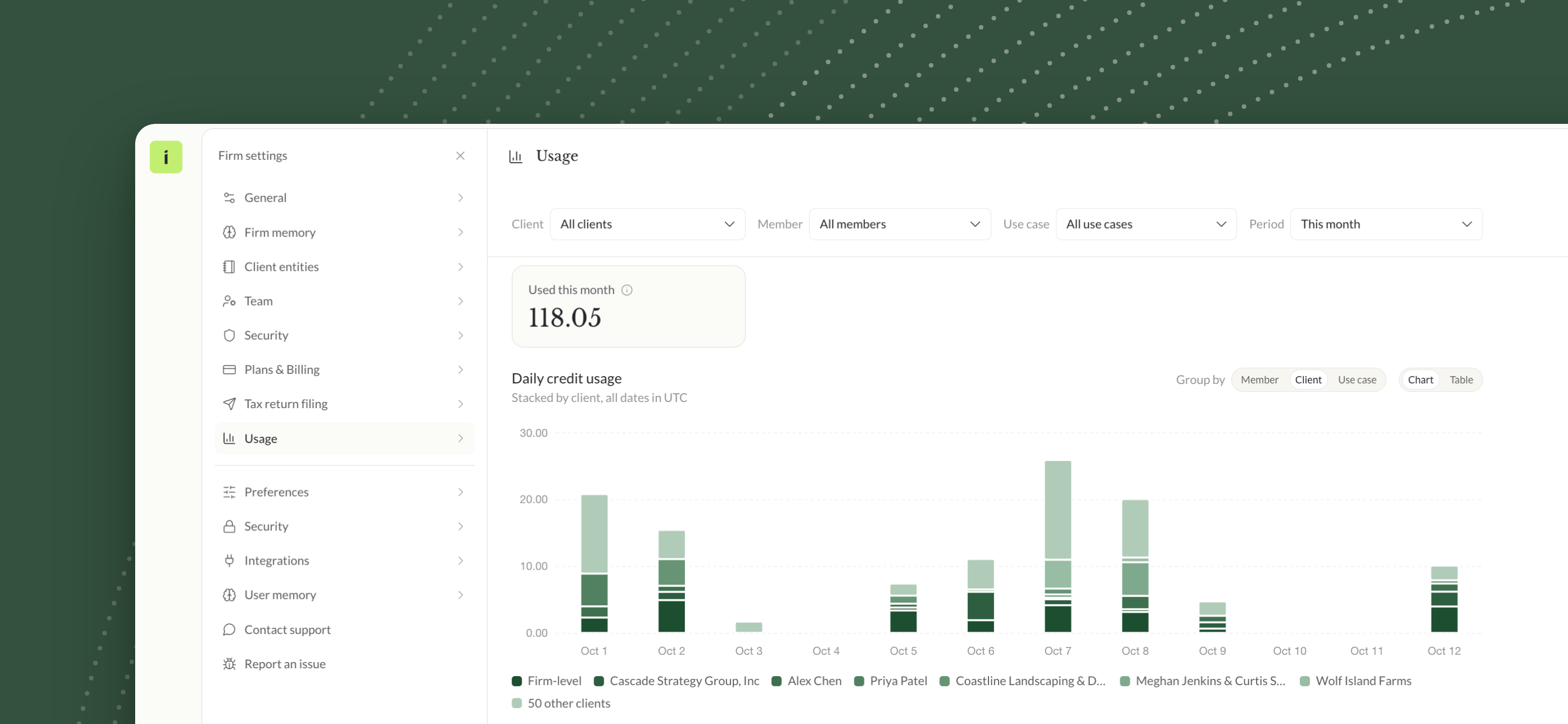
The Clients table lists every client with its credits, its share of the firm's usage and a daily trend, with a Firm-level row for AI work outside any one client.

Group by switches the same data between member, client and use case, as a chart or a table. The use cases are Chat, Workflow, with each workflow by name, and Documents.

For policy, a firm owner can set a monthly credit limit for any member or any client, and Default limits for everyone without a limit of their own. Past a limit, AI usage is blocked until the 1st of next month, and a limit of 0 turns it off.
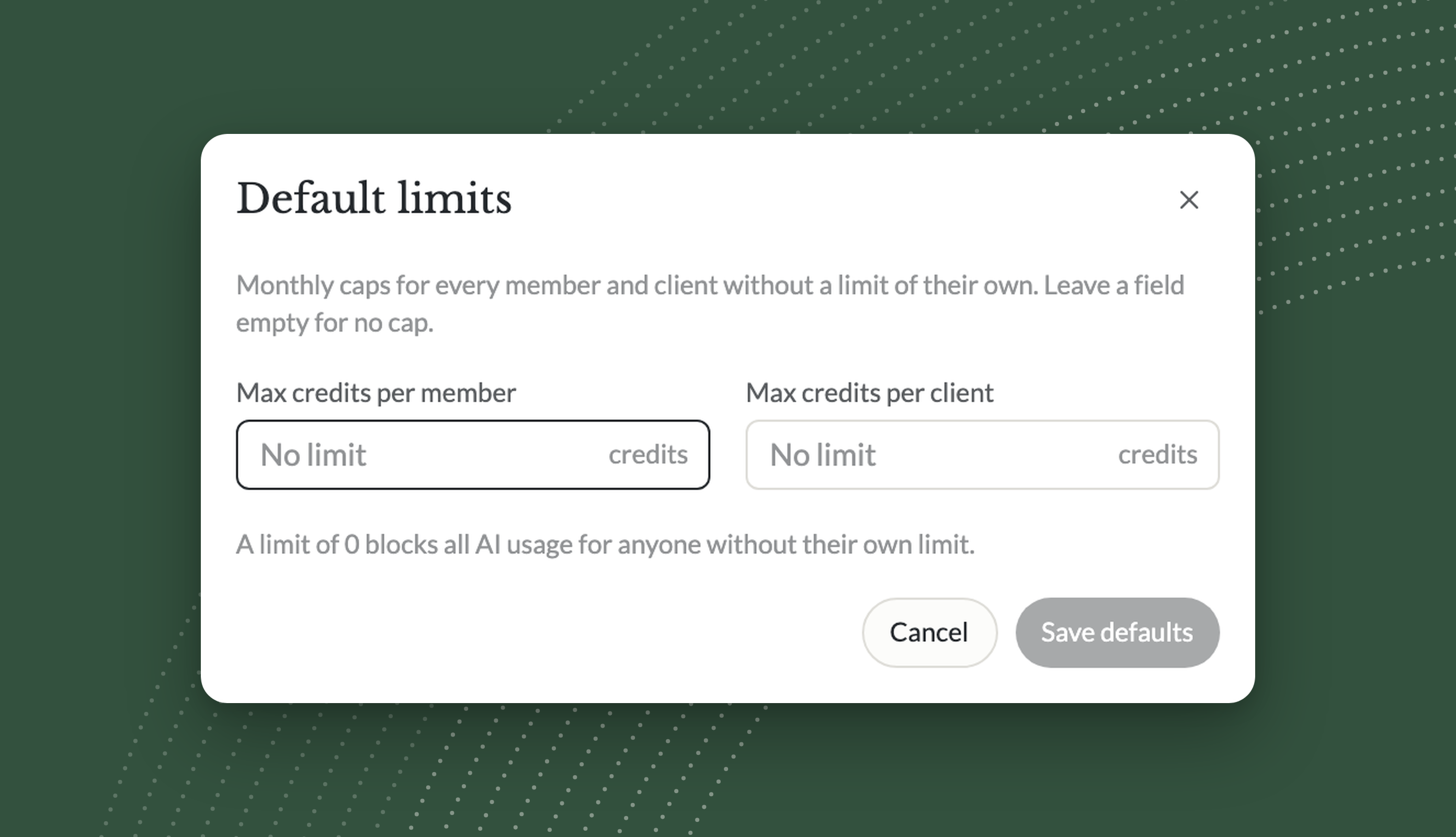
Usage counts credits, not dollars. The firm's own plan and records turn credits into cost when it needs to, and the view stays with firm owners, the people who already allocate its labor and capital.
Allocating intelligence on purpose
Firms learned to manage labor once they could see it per person and per client, and much of how a firm is run today grew out of that view. Intelligence is at the same point now. The firms that see it clearly will be the ones that can use more of it with confidence.
Five questions to ask about AI usage in your firm
- Can you see AI usage for each client, not just for the firm as a whole?
- Can you see it for each person and for each kind of work?
- Do you know what share of the firm's AI usage your largest clients take?
- Is there a default limit for every person and client, and who sets it?
- Does intelligence cost show up anywhere in how you price the work?

Free white paper
The cost of intelligence
A new line item for the accounting firm
Why intelligence is now a cost to allocate like labor and capital, how to see it per person and per client, and what it changes for pricing, staffing and client profitability. Free PDF.
Download the white paperHow should your accounting firm manage the cost of AI?
Usage in the Instead AI tax platform shows your firm's AI credits by member, client and use case, and lets firm owners set monthly credit limits for each.
For the full argument, download the white paper. To see it on your own firm, start your trial at instead.com.
Frequently asked questions
Q: What is the cost of intelligence in an accounting firm?
A: The cost of intelligence is what a firm spends on the AI that does part of its client work, from chat to workflows to reading documents. It sits next to labor and capital as a third line item, and it varies by client, by person and by kind of work, so it needs its own view.
Q: Why should accounting firms track AI usage per client?
A: Accounting firms should track AI usage per client because intelligence is now part of the cost of serving each client. Per-client usage shows which clients draw the most AI work, which helps a firm price engagements and judge client profitability from its own records.
Q: What are AI spend controls for accounting firms?
A: AI spend controls for accounting firms are policies that cap how much AI each person and each client can use, usually by month. They work like a staffing plan or a budget. In Instead, firm owners set monthly credit limits per member and per client, with firm defaults for everyone else.
Q: Does high AI usage mean someone is wasting it?
A: High AI usage does not by itself mean waste. The person who uses the most may be the one running agents across the most clients. A firm learns more by comparing usage with the work it produced than by cutting back its heaviest users, and limits are there to set policy, not to ration.
Q: How does Usage in Instead show AI usage?
A: Usage in Instead shows AI usage in credits on a page in Firm settings. It shows the credits used this month, a daily credit usage chart and every client's credits and share, grouped by member, client or use case, as a chart or a table. Only firm owners see it.
Q: Does Usage show the cost of AI in dollars?
A: No, Usage shows AI usage in credits, not dollars. Every figure on the page is counted in credits. A firm turns credits into cost with its own plan and records, and the per-client shares already show where its intelligence goes and which clients take the most.
Q: Do I need to fill in a form to read the white paper?
A: No, you do not need to fill in a form to read the white paper. It is a free PDF download on this page, with the full argument on intelligence as a line item and on how to manage it per person and per client, and what it changes for pricing.


Partner allocations, from last year's software to every K-1

The Destruction of the Billable Hour: AI's Impact on Accounting Firm Pricing in 2027

Year-End Tax Planning 2026: Checklist of Strategies by Dec 31



.png)