
How to trace a 1065 from source documents to the workpaper to the return

A number on a partnership return should lead somewhere. In Instead it leads down three layers. Source document to workpaper, workpaper to return, and input screen to the workpaper or the source. We tested it on a complex 1065 and counted the links and ties.
Short answer: In Instead, source documents link to the workpaper, the workpaper ties to the return, and input screens tie to the workpaper or the source. Click a tied value on the return or an input screen and the workpaper or the source opens at the cell or line. In our test, 51 of 56 workpaper amounts link to their source line.
What we put in: 11 documents for a five-partner partnership
Our test case, Brackenridge Commons Partners, LP, is fictional. It is a real estate partnership with five partners, a four-tier distribution waterfall, a GP promote, a guaranteed payment and $3.2 million of Section 704(c) built-in gain on land that one partner contributed. The partnership sold that land in 2025.
We dropped 11 documents into the client's 2025 folder. The partnership agreement, trial balance, partner capital schedule, partner information sheet, distribution notice, settlement statement, fixed asset register, property operating statement, a lower-tier K-1, a Form 1098 and a Form 1099-INT. A draft 1065, an allocation workpaper and five K-1s came back. Then we followed the numbers.
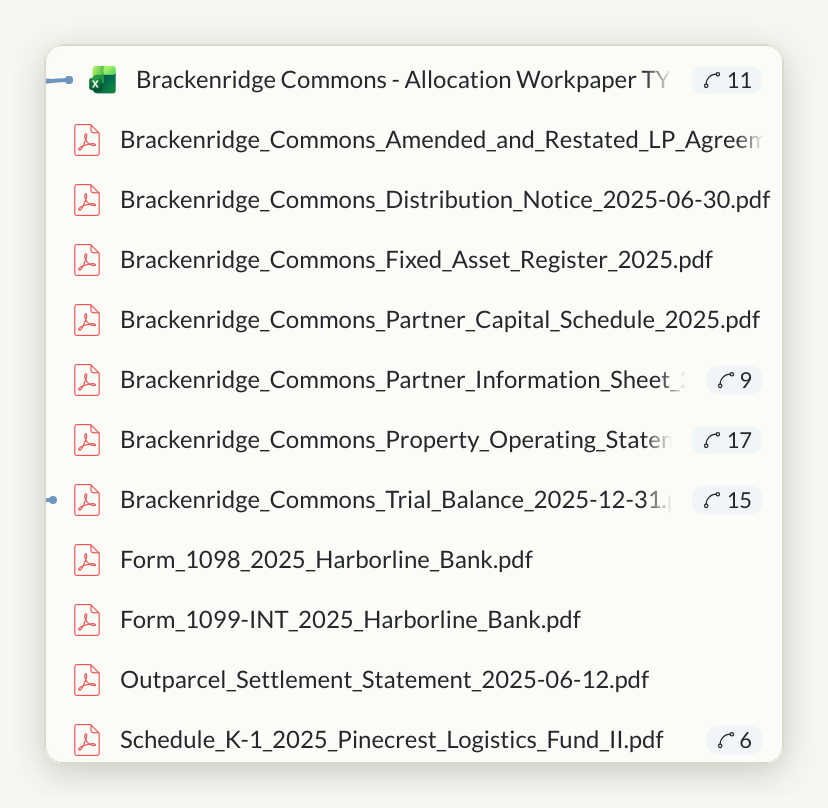 The Related panel lists the workpaper and the source documents, with a tie count beside each tied one.
Layer 1: source documents linked to the workpaper
Source document to workpaper. 51 of the 56 typed amounts in the workpaper link to the source document line they came from, and 10 of the 11 source documents feed it.
Click a linked value on a source document and Instead names the workpaper cell it feeds. On the land sale settlement statement, the seller credit of $6,700,000 names cell C4 on the Promote & 704(c) Gain tab, the contract sales price. Open the workpaper and the same cell names the statement line it came from.
Our count covers the 56 typed, nonzero amounts on the four calculation tabs. Formula cells and the tie-out tab restate totals, so they are out of scope. In all, the workpaper holds 103 links to the source documents.
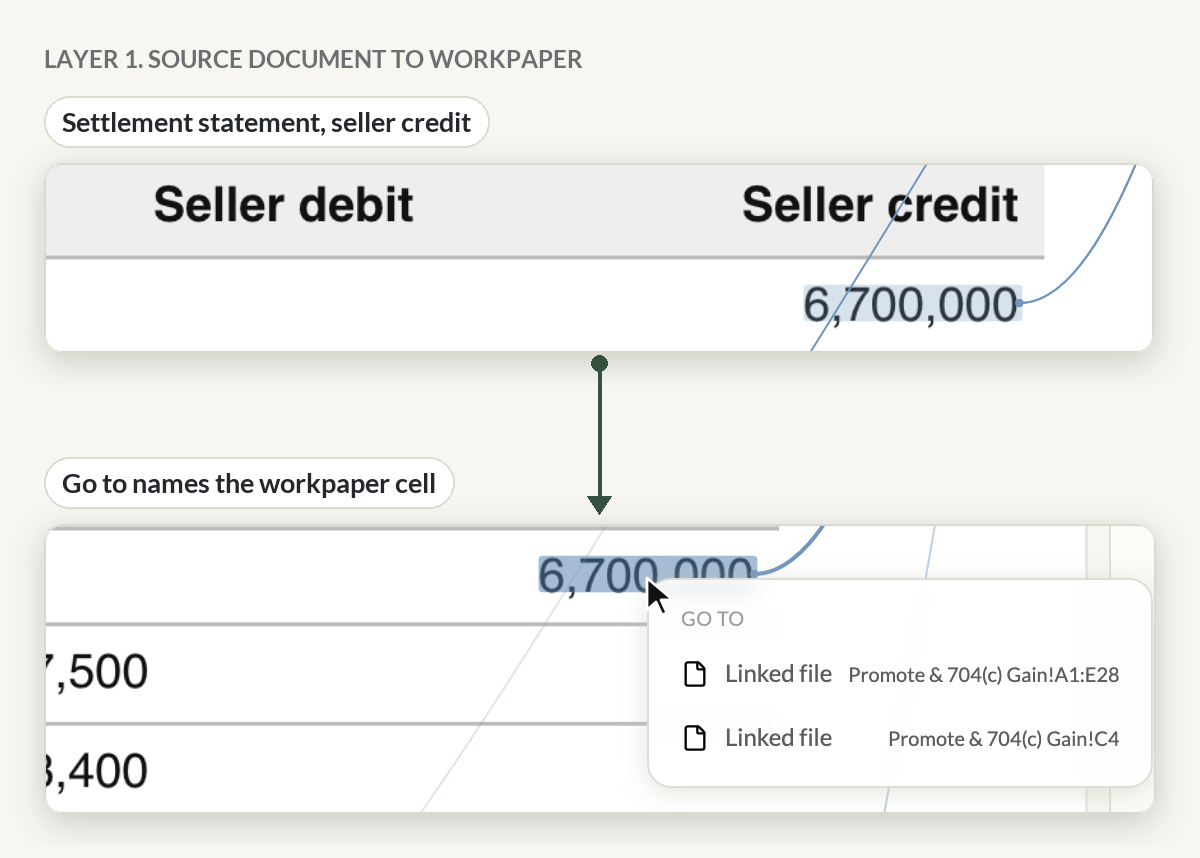 The seller credit names the workpaper cell it feeds
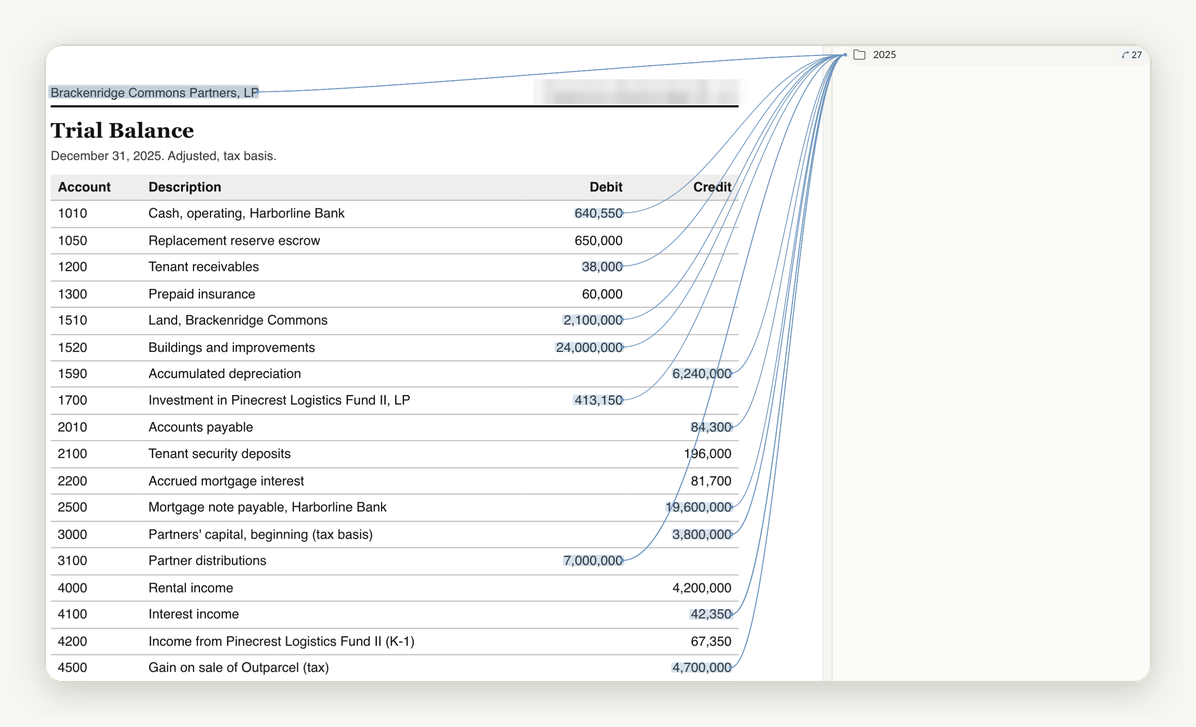 Trial balance values with their link lines
Layer 2: the workpaper tied to the return
Workpaper to return. 11 of the 13 return lines that match a workpaper cell are tied to that exact cell.
Open the return and click Schedule M-2 line 1, beginning capital of $3,800,000. The Related panel lists the workpaper with its tie count. Pick it and the workpaper opens at Capital Accounts cell B9, marked Tied. Schedule M-2 line 6a, cash distributions of $7,000,000, opens the Distribution Waterfall tab at cell H10.
The 11 tied lines are ordinary business income on page 1, Schedule K lines 1, 4a and 10, Schedule M-1 line 1, Schedule M-2 lines 1, 6a and 9, partners' capital at the start and end of the year on Schedule L, and the Section 1231 gain on Form 4797.
 Schedule M-2 line 1 opens the workpaper at Capital Accounts B9
Layer 3: input screens tied to the workpaper or the source
Input screens to the workpaper or the source. Every typed value on the Form 8825 rental screen is tied to its source, and 35 of 39 typed values across the input screens are tied to a source document or the workpaper.
A tied input carries a trace badge. Click the badge on Schedule M-2 line 6a, cash of $7,000,000, and pick the workpaper. It opens at Distribution Waterfall cell H10, marked Tied. On the Form 8825 screen, gross rents of $4,200,000 open the property operating statement at the gross rents line.
By screen, Form 8825 is 15 of 15, the received K-1 is 4 of 4 and the main Form 1065 screen is 16 of 20. Of the 31 typed amounts, 30 are tied.
 An input opens the workpaper at the cell it came from
Choosing the workpaper or the source document
Some values hold two ties. Schedule M-2 line 1, beginning capital of $3,800,000, is tied to the workpaper and to the trial balance. Click it and the Related panel lists both, with a line to each.
Pick the workpaper and it opens at Capital Accounts cell B9. Go back to the list and pick the trial balance, and it opens at the partners' capital row. Where a return value holds both ties, you choose the workpaper or the source document.
 One value, two ties. You choose.
What did not tie, and why
Some counts fall short of complete, and each gap has a reason. In the workpaper, 5 of the 56 amounts have no source link. One is a 100% total, one is the $220,000 residual gain, and three are computed percentage splits typed as numbers. The Form 1098 feeds no workpaper cell, because its mortgage interest sits inside the property operating statement.
On the return, Schedule K line 5 interest of $45,500 is a calculated roll-up that cannot take a tie. The Form 4797 gross sales price sits in a locked fixed asset row. K-1 amounts are engine outputs from the Schedule K allocation, so they have no field to tie.
On the input screens, the untied values are a beginning cash plug on Schedule L, the tax period dates and the name control. A reviewer can check each one by hand before signing.
Free white paper
Traceable partnership returns
Source to workpaper to return, in three layers
The three layers of a traced five-partner 1065, with the counts and what did not tie. Free PDF.
Download the white paperWhat to ask before you trust a traced partnership return
Questions to ask before you commit:
- Can you click a source document value and see which workpaper cell it feeds?
- Can you click a return line and open the workpaper at the exact cell?
- Can you click an input and open the workpaper or the source document?
- When a value holds two ties, can you choose which one to open?
- Can you see what is not tied yet, and why?
Follow a partnership number to its source before you sign
Drop one partnership's documents into Instead and follow the numbers down the three layers. See how traces fit the Instead AI tax platform, or start your trial at instead.com. Cancel your legacy tax software this season.
Frequently asked questions
Q: What is a trace in Instead?
A: A trace is a link or tie between a value and the place it came from. Source document values link to workpaper cells, and return lines and inputs tie to workpaper cells or source documents. Click a tied value and the other document opens at the cell or line.
Q: Can one value be tied to both the workpaper and the source document?
A: Yes. In our test, Schedule M-2 line 1 is tied to the workpaper and to the trial balance. Click it and Instead lists both, with a line to each. Pick the workpaper and it opens at the cell, or pick the trial balance and it opens at the row.
Q: Is every workpaper amount linked to a source document?
A: Not in our test. 51 of the 56 typed amounts in the workpaper link to the source document line they came from. The other five are a total, a residual and three computed splits. 10 of the 11 source documents feed the workpaper.
Q: Is the 1065 that Instead prepares ready to file?
A: No. Agent output is a draft that the preparer reviews. The traces show where each number came from, so review becomes checking, not hunting. You follow the numbers you would check anyway, look at what is not tied, and file through your normal process.
The tax year's review in one PDF

Who changed this number? Activity in Instead

Instead remembers every client

How to build custom workflows for your tax firm with an AI agent


