
The 1040 Filing Workflow in Instead: Intake to E-File
.png)
In most high-volume 1040 practices, the bottleneck is not preparation. It is review. Reviewers cannot be added quickly, and review capacity is what determines how many returns a firm can actually put through a season.
Most evaluations of a tax platform stop at the demo. A Head of Tax at a Top 200 firm watches a return get built, agrees it looks capable, and then has to decide whether to put real client volume and real staff hours behind it. That decision needs something a demo does not give you: the actual sequence of what happens to a 1040, where the work is automated, where a preparer still has to think, and what the reviewer is holding when the file reaches them.
Short answer: Documents are classified on intake, values trace to source, the return builds from the workpaper, and a reviewer clears structured findings before signer approval.
This is the 1040 filing workflow end to end, described as the firm experiences it rather than as a feature list.
How the 1040 filing workflow runs from start to finish
The 1040 filing workflow runs in five phases, and each one closes before the next begins: source document intake, workpaper population with source citations, return input population, calculation and review, and final verification and filing.
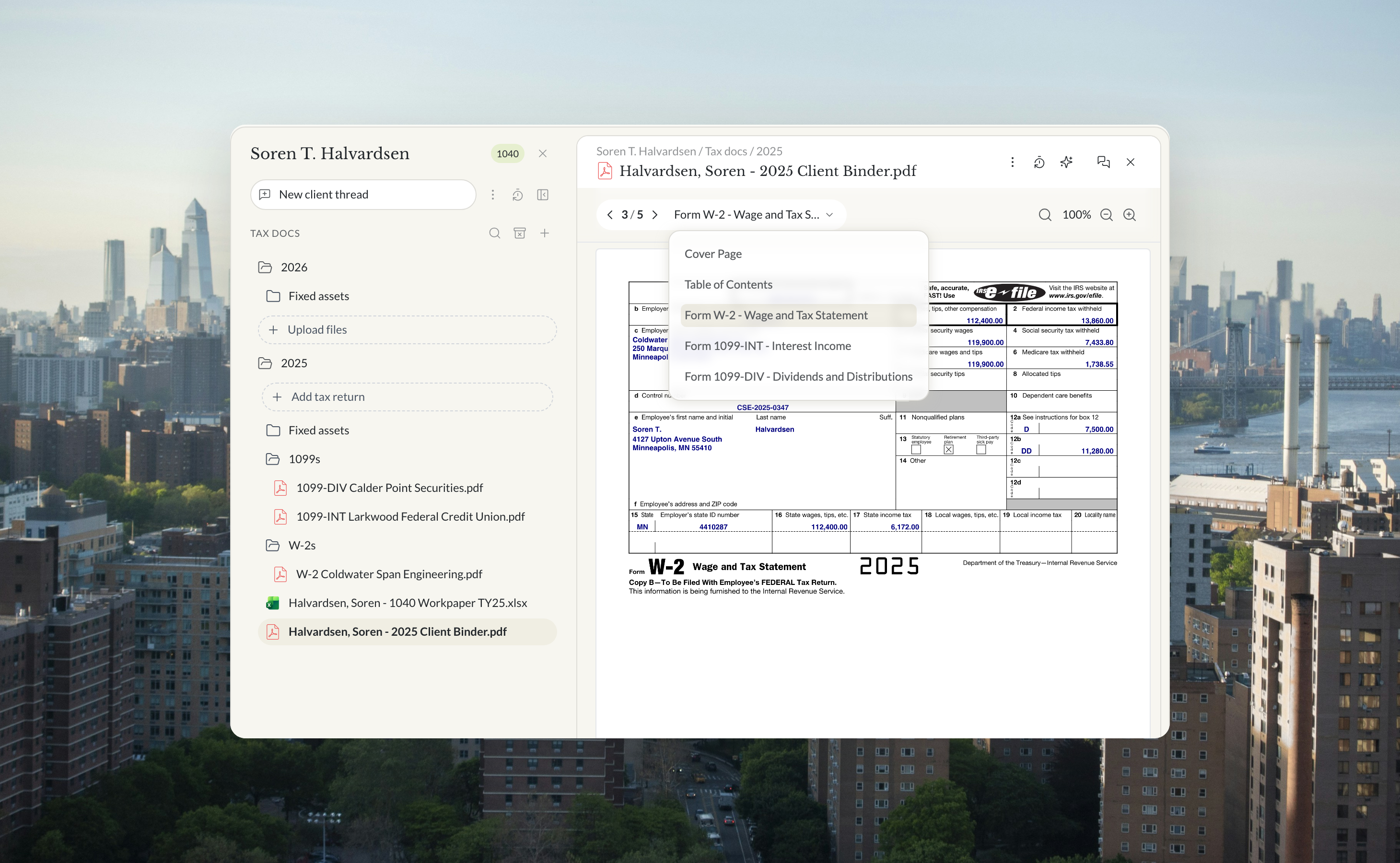
- Source document intake. Client documents land in the tax year folder for that client. Each is read, classified by form type, and assigned to a tax year. Anything that cannot be matched to a client is flagged for a person to assign rather than guessed at.
- Workpaper population. Values move out of the documents and into the correct tab of the 1040 workpaper. Every input carries a reference back to the document and page it came from.
- Return input population. A form is created for each recognized tax form, one per W-2, one per 1099, one per K-1, while supporting records flow into the workpaper rather than becoming forms of their own. The return and its schedules are built from the workpaper.
- Calculation and review. The return is computed, diagnostics are surfaced, and the workpaper is reconciled against the return inputs.
- Final verification and filing. A last pass confirms every document was processed and every input has a source reference, open questions are resolved, and the return is ready for signature and transmission.
One point matters more than the sequence itself. The workpaper is the working authority during preparation, and the return inputs are what ultimately get filed. Those are two different artifacts with two different jobs, and keeping them distinct is what makes the reconciliation in phase four meaningful rather than decorative.
How source documents come into the 1040 workflow
Documents arrive as files and leave intake as classified, dated, client-assigned records.
You upload what the client sends into that client's tax year folder. Each document is read, identified by what it actually is, and mapped to the workpaper tab it feeds. Filenames are treated as unreliable, which is deliberate: a file named for one form type routinely contains another, and confirming content over label is the difference between a clean workpaper and a misclassified one that survives to review.
The 28 document types a 1040 draws on, across seven categories:
- Income: W-2, 1099-INT, 1099-DIV, 1099-B, 1099-R, 1099-NEC, 1099-MISC, 1099-K, 1099-G, SSA-1099, and Schedule K-1 from Partnerships and S Corporations
- Deductions: Form 1098 for mortgage interest, 1098-T for tuition, 1098-E for student loan interest, property tax bills, charitable receipts, medical expense records
- Health coverage: 1095-A (Marketplace coverage), which reconciles the advance Premium Tax Credit on Form 8962
- Business: profit and loss statements, bank statements, mileage logs, home office measurements
- Rental: income and expense records, property management statements
- Payments: estimated tax vouchers and payment confirmations
- Prior year: the last filed return, and the draft return once one exists
The prior-year return is not just another document in the pile. It is read first, because it establishes the context for the year: which income sources recur, which schedules were filed, which entities flow through, and which carryforwards must appear this year. The gating decision that comes out of that read is filing status, because it sets the standard deduction, the tax brackets, and the income thresholds at which credits, the Additional Medicare Tax, and the Net Investment Income Tax begin to apply. A workpaper built without reading it is a workpaper that does not know what is missing.
How the 1040 workpaper builds citations to source evidence
Every value in the workpaper points back to the document and page it came from.
The workpaper is structured as a leadsheet plus detail tabs. The leadsheet carries the full flow of the return across eight summary lines, from income through adjusted gross income, taxable income, tax, credits, other taxes, and payments, to the refund or balance due. The detail tabs hold the granular current-year data behind each of those lines, one tab per category, with one column or row per document. Current-year values on the leadsheet reference the detail tabs rather than being entered directly, so a number on the summary can always be followed down to the document that produced it.
Two separations do the real work here. Current-year and prior-year data never mix inside a detail tab, because the moment they do, a variance check stops meaning anything. And unresolved items are split by what they need rather than lumped together: a missing document is tracked as missing information, while a judgment call or a conflict between documents is tracked as an open point needing a decision. Those are different queues for different people, and merging them is how a question that needed a partner ends up sitting in a list of document requests.
Traceability is also what makes the work reviewable at all, without treating the calculation as government-approved tax math. A reviewer who can see where a figure came from is checking evidence. A reviewer who cannot is checking arithmetic and hoping the inputs were right.
What Instead automates in 1040 preparation
Extraction, classification, schedule creation, and computation are automated, and judgment is not.
What Instead does: reads each document and pulls the fields, writes them to the mapped workpaper tab, creates a form for each recognized tax form, builds the return and every applicable schedule from the data present, and computes the result. The schedules created are driven by what the data calls for rather than by a fixed checklist, so a return with a rental and a brokerage account produces different schedules than one with a single W-2.
What a preparer still owns: confirming filing status and dependents, deciding standard against itemized, making elections, resolving conflicts between documents, judging whether an activity is passive, determining each year whether a pass-through business is a specified service trade or business (SSTB) rather than carrying that classification forward from the prior year, setting a placed-in-service date the paperwork leaves ambiguous, and deciding whether an assumption is safe enough to carry. Extraction confidence is recorded rather than hidden, and anything Instead is less certain about becomes an open point rather than a silent value in a cell.
The distinction to hold onto is that automation moves data and computes results, while the preparer decides what the data means. When a diagnostic appears, it is resolved by correcting the underlying source data rather than by overriding a computed figure. Overriding an output produces a return that reconciles to nothing, and a return that no longer ties to its workpaper is a compliance exposure rather than a documentation gap.
What a reviewer sees in the tax return review workflow
The reviewer opens a structured findings file rather than a finished return and a hope.
Review output is organized into action items and reference items. Action items are the findings that need a decision, each carrying the check that produced it, what was found, a severity, and a field to mark it addressed. Reference items are the checks that passed, which exist so the reviewer can see what was verified rather than inferring it from silence.
The six things the reviewer has in front of them:
- An inventory of every source document available for the review, so an absent document is a visible finding rather than an assumption
- Findings requiring action, grouped by area, with severity from critical down to low
- The specific source document and workpaper location behind each finding, so nothing has to be hunted for
- Passed checks, held separately as reference
- Open points and missing information, kept as distinct queues
- The tie-out between workpaper and draft return, where a draft exists
Findings are written to be specific. Not that income does not match, but which box on which document holds which figure against which workpaper line, and what the difference is. Tolerances are set deliberately: source document amounts are expected to match exactly, computed totals carry a small allowance, and estimates are assessed for reasonableness rather than to the dollar. There is also an explicit list of things not to flag, because a review that reports rounding differences and informational checkboxes trains the reviewer to skim, which is worse than a review that reports less.
How review findings get resolved before the return is filed
Each finding is assigned, dispositioned, and closed inside the return before it moves to signature.
A finding carries one of four severity levels, and the level determines how it is treated. A material error or a missing mandatory item stops the return. A significant error affecting liability is corrected before review continues. A question requiring clarification goes back to the client or the partner. A minor completeness point is fixed and noted. Each one is marked addressed or explicitly not applicable, so the file shows what was decided rather than only what was found.
Corrections are made at the source, which is why the resolution path matters. Fixing the document reference or the extracted value flows the correction through the workpaper and into the return. Editing the output leaves the workpaper saying one thing and the return saying another, and the reconciliation step in phase four exists precisely to catch that divergence.
This is finding management inside a single return. Findings are structured, assigned, and closed before filing, so a return does not reach a signer with an open material item behind it.
How signer approval and e-file work for a 1040
A return becomes ready to file when diagnostics are cleared, the taxpayer has authorized it, and the filing credentials are in place.
Readiness has three parts, and they are independent of each other:
- Diagnostics and validation. Every return generates diagnostics, and unresolved ones are the practical bottleneck between a finished return and a transmitted one. A single bad field can cause a rejection, so these are cleared before submission rather than discovered after it.
- Taxpayer authorization. Form 8879 is the IRS e-file signature authorization for an Individual return. The electronic return originator must obtain and retain a completed Form 8879, which permits the return to be transmitted on the taxpayer's behalf.
- Provider credentials and obligations. The rules for authorized e-file providers of Individual income tax returns, including electronic filing identification number requirements and the responsibilities attached to originating a return, come from IRS Publication 1345.
Filing and printing are where government approval attaches. Approval must be verifiable by form and jurisdiction; it should never be presented as government endorsement. Approval does not extend to the calculations, and no part of this workflow should be read as the IRS having validated the tax math.
One limit worth being direct about. The set of jurisdictions available for live transmission changes as approvals land, so confirm the current filing scope for the jurisdictions your clients actually file in before you plan around it. This holds on the federal side too: computing a return and being approved to transmit it are separate questions, not only for states.
How state returns flow from the federal 1040
State returns are built from the federal data already in the workpaper, and the workpaper carries state columns alongside the federal ones.
The leadsheet holds federal current year, federal prior year, the difference, and state columns, so state figures are structured from the start rather than reconstructed later. State wages and withholding come off the W-2 boxes that carry them, and local wages and withholding come off the boxes below those, which are the fields most often left out of a workpaper and the reason a state return comes back wrong more often than a federal one does.
Residency drives the return set. A rental property in a state the taxpayer does not live in generally means a nonresident return for that state, and the check for whether one exists is part of the review rather than an afterthought. Because the state figures reference the same detail tabs as the federal ones, a corrected document updates both rather than one.
Keep two things separate when you evaluate this. Calculating a state return from federal data is a calculation capability. Being approved to transmit that return electronically to a particular state is a separate question with a separate answer per jurisdiction, and the two should never be read as one claim.
What the firm controls, and what Instead handles
The firm keeps every decision that carries professional judgment, and Instead handles movement, computation, and checking.
The pattern is consistent. Every row where a regulator or a client could second-guess a decision stays with the firm.
What changes for firm operations when 1040s run on Instead
The work that disappears is reconstruction, and the work that gets better is review.
Most of the hours in a 1040 are not spent deciding anything. They are spent retyping values, chasing which document a number came from, rebuilding a prior-year picture, and re-verifying figures that were already correct. In most firms today, that reconstruction happens across manual workpapers, standalone spreadsheets, and separate prep and review tools that pass data between them through exports. The path from documents in to return out crosses multiple handoffs, and each one is a place where something can be missed. Compressing that changes where the senior time goes. A reviewer who opens a structured findings file with severity and source references attached is doing the work only a reviewer can do, rather than reconstructing the preparer's path first.
That has a staffing consequence worth naming. Review capacity, not preparation capacity, is what limits how many returns a firm can put through a season, because reviewers are the people who cannot be added quickly. At a firm running thousands of 1040s between January and April, the binding constraint is how many files a senior can clear in a day. Turnaround also stops depending on who happened to prepare the file, because the evidence trail is the same regardless.
The honest version of the benefit is narrower than it sounds. Less time reconstructing, more reviewer leverage, and a faster path from documents in to return out. What does not change is who is responsible for the return.
How to see the 1040 filing workflow before committing team time
Instead is an AI-native platform for tax preparation, review, and filing across Individual and entity returns, and the 1040 workflow described here sits inside that wider system rather than beside it. The Instead AI tax platform is where document intake, workpapers, returns, review, and filing operate as one path rather than as separate tools joined by exports.
Questions to ask before you commit:
- When a file reaches review, is the reviewer opening a structured findings list with severity and source citations, or do they still need to reconstruct what the preparer did?
- Does e-file authorization cover the tax calculations, or does approval attach to transmission and printing only?
- Which decisions stay with our licensed preparers and signers, and which does the system make?
- What documentation supports our vendor risk and security review, and is a SOC 2 Type II report available?
- Can we pilot this against a subset of our own 1040 return mix before committing full client volume?
Walk through the 1040 workflow with our team to see the intake, workpaper, review, and filing steps against your own return mix.
Review platform pricing to see how firm and client billing works before you plan a pilot.
Frequently asked questions
Q: How does a 1040 workpaper trace back to source documents?
A: Every current-year value on the leadsheet references a detail tab, and every detail tab entry carries the source document and page it came from. Prior-year figures are entered separately and never mixed into current-year detail tabs, so a variance between years remains meaningful. The result is that any figure on the summary can be followed down to the document that produced it.
Q: What does a reviewer see in an agent-prepared 1040?
A: The reviewer opens a structured findings file rather than a finished return. Action items are grouped by area with a severity from critical to low, each citing the specific source document and workpaper location behind it. Checks that passed are held separately as reference, and open points are kept distinct from missing documents so the two queues reach different people.
Q: What is automated versus preparer input on a 1040?
A: Extraction, classification, schedule creation, and computation are automated. Filing status, dependents, elections, the standard against itemized decision, activity classification, and any conflict between documents remain preparer decisions. Diagnostics are resolved by correcting the underlying source data rather than overriding a computed figure, which preserves traceability between workpaper and return.
Q: How do state returns flow from the federal return?
A: The workpaper carries state columns alongside federal ones, so state figures are structured from the start rather than rebuilt later. State and local wages and withholding come off the corresponding W-2 boxes, and residency determines whether a nonresident return is required, for example, where a rental property sits outside the taxpayer's resident state. Calculating a state return and being approved to transmit it electronically to that state are separate questions.
Q: How does e-file readiness work for 1040 returns?
A: Three things must be true. Diagnostics and validation errors are cleared, because a single bad field can cause a rejection. The taxpayer has authorized the return on Form 8879, which the electronic return originator must obtain and retain. And the provider obligations in IRS Publication 1345, including electronic filing identification number requirements, are satisfied.
Q: What happens when a client sends a document after preparation has started?
A: The document lands in the client's tax year folder, is classified, and is written to the workpaper tab it feeds, the same as any other document. Because the leadsheet references the detail tabs rather than holding entered values, the affected lines update and the workpaper-to-return tie-out re-runs. A late document does not require rebuilding the schedule, and the reviewer sees a new finding rather than an unexplained change.
Q: Does the IRS approve the tax calculations?
A: No. Government approval attaches to electronic filing and printing, not to the computation of a return. The workflow described here should be read without treating the calculation as government-approved tax math.

How AI Tax Orchestration Works in Instead

.png)

What to Ask an AI Tax Vendor Before Tax Season



.png)